
Swellai
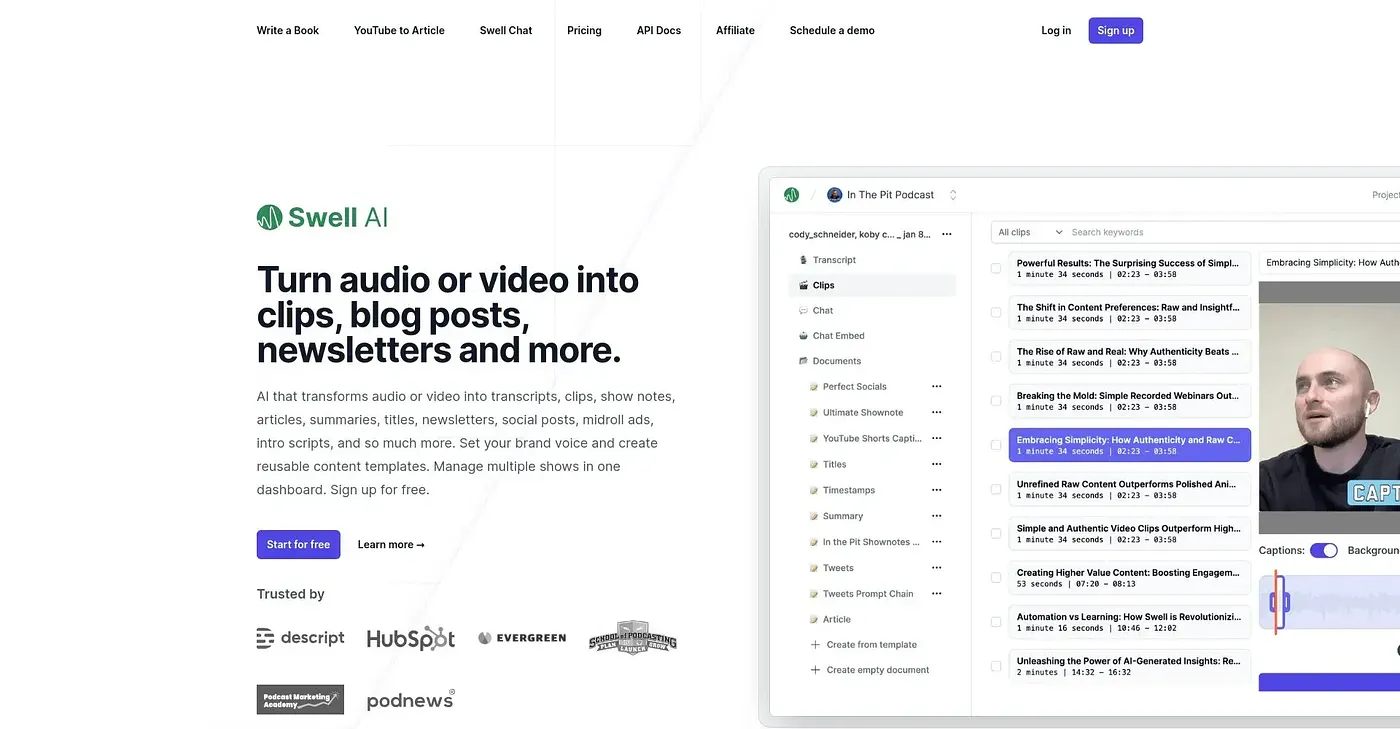
Swell AI transforms audio or video into a variety of content types but charges extra for advanced customer support. It is easy to use and great for saving time on transcription and repurposing content.
At a glance
4.0 out of 5
Scored by Alex after real useOur verdict
Swell AI excels at turning your media into different formats quickly. However, it lacks built-in premium customer support unless you pay extra.
✓What it does well
✕Where it falls short
Key features
Questions about Swellai
What does Swellai do?
Swellai turns audio or video into a range of content, including clips, blog posts and summaries. Its automated transcripts identify speakers on their own, and a transcription editor lets users highlight and clip sections for quick repurposing. The reviewer says it is easy to use and saves time on transcription.
Is Swellai free?
Swellai has a limited free tier that covers basic transcription. Unlimited GPT-3.5 writing and Swell ChatGPT documents and templates come with the $29/mo plan, while the $100/mo plan includes all features except extra customer support.
What are the downsides of Swellai?
The reviewer points out that advanced customer support costs extra beyond the free plan, and that the free tier lacks advanced features. Swellai also provides no SEO optimization for generated content, which can affect visibility, so Toolio lists search engine optimizers under "Not for".
Can Swellai transcripts be shared with a team?
Yes. Swellai has a public sharing feature that shares a transcription through a link, for team collaboration or public access. Its AI suggestions also flag the most engaging parts of a transcript, which helps when picking sections to turn into clips or posts.
What are some alternatives to Swellai?
Toolio lists ResearchGPT, Listen 411, Deepgram and Token Counter as alternatives to Swellai. Listen 411 transcribes podcasts quickly on a pay-as-you-go basis, Deepgram is described as best for quick, free transcription of audio and video, and ResearchGPT is limited to research paper PDFs.